
[Solved]Today Going Create Universe Control Life Death Actually Going Implement John Conway S Game Q37296843
CPROGRAMMING NEED HELP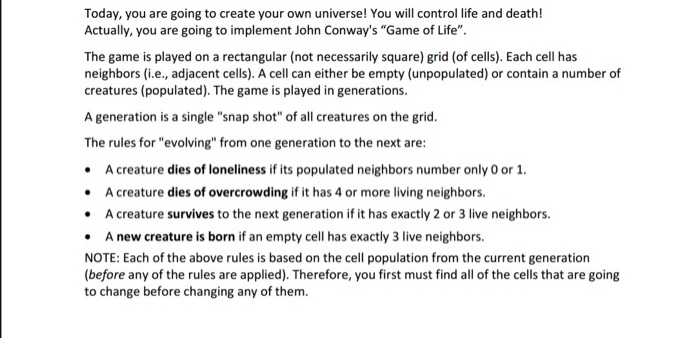
 Today, you are going to create your own universe! You will control life and death! Actually, you are going to implement John Conway’s “Game of Life”. The game is played on a rectangular (not necessarily square) grid (of cells). Each cell has neighbors (i.e., adjacent cells). A cell can either be empty (unpopulated) or contain a number of creatures (populated). The game is played in generations A generation is a single “snap shot” of all creatures on the grid The rules for “evolving” from one generation to the next are A creature dies of loneliness if its populated neighbors number only 0 or 1 A creature dies of overcrowding if it has 4 or more living neighbors. A creature survives to the next generation if it has exactly 2 or 3 live neighbors A new creature is born if an empty cell has exactly 3 live neighbors. NOTE: Each of the above rules is based on the cell population from the current generation (before any of the rules are applied). Therefore, you first must find all of the cells that are going to change before changing any of them. The game ends when a user decides to no longer evolve additional generations, or when all the creatures have died. The following website might be helpful hn Conw Implementation Your code will need to do the following 1. Create a MxN 2D array (matrix) that is the game board: for example, M 25 and N-30 The program should provide two modes for initializing the board A. Automatic Mode The program randomly populates the board with creatures, with each cell having a 1 in 10 chance of containing a creature B. File Mode The program asks the user to enter a file name that specifies creatures to be placed on the board. The program should quit if the user does not provide an appropriate file 2. Create a function to print the board. Empty cells should be represented by a space Creatures should be represented by a “printable” character (such as #). Display the board immediately after it has been initialized and at each generation thereafter. A notation as to the generation number is to be provided as well NOTE: In the print function, a call to a system function may be used to clear the terminal window: on a Windows system use system(“cls”) on a Unix system use system (“clear”) . Create a playGame function that takes the board as a parameter and evolves it to the next generation. After each new generation is created, the board is to be printed with the generation number as a title. Allow the user to control the evolution of the game by advancing/evolving it when the user hits the enter key. Terminate the game when the user enters a quit string or quit character, or when all creatures are dead (extinction). When the game terminates because of extinction, the user is to be notified #include <stdio.h> int main(void) int ii const int max filename 101; char filename[max filename)- “Lab06 1ife.txt ; const int max rows50; const int max cols 50 int board[ max rows ] [max cols] FILE fpi /I Prompt the user for a file name // Open the file containing creature data fp-fopen (filename, “r if (fpc=NULL ) printf(“The return -99; file (%s) NOT was opened.n”, filename else printf (“The file (%s) opened.n”, was filename // read the number of rows and columns of data if( fscanf ( fp, ” td”, &nun rows ) if (num row< num rows>max rows) 0) if( fscanf ( fp, ” %d”, &num cols ) .. 0) if (num cols<5 I num cols>max_cols) // From the data file, read each row for) for:) if( fscanf(fp, ” %d”, &board[1][j] ) 0) printf(“Unable to read the fclose (fp)i II close the file when return 0; designated number of elements.In”)i done reading fclose(fp): reading close the file when done return 0; 1 35 30 2 0000000000 0000000000 0000000000 3 0000000000 0000000000 0000000000 4 0000000000 0000000000 0000000000 5 0000000000 0000000000 0000000000 6 0000000000 0000000000 0000000000 8 0000000000 0000000000 0000000000 9 0000000000 0000000000 0000000000 10 0000000000 0000000000 0000000000 11 0000000000 0000000000 0000000000 12 0000000000 0000000000 0000000000 13 14 0000000000 0000000000 0000000000 15 0000000000 0000000000 0000000000 16 0000000000 0000000000 0000000000 17 0000000000 0000000000 0000000000 18 0000000000 0000000000 0000000000 19 20 0000000000 0000000000 0000000000 21 0000000000 0000000000 0000000000 22 0000000000 0000000000 0000000000 23 0000000000 0000000000 0000000000 24 0000000000 0000000000 0000000000 25 26 0000000000 0000000000 0000000000 27 0000000000 0000000000 0000000000 28 0000000000 0000000000 0000000000 29 0000000000 0000000000 0000000000 30 0000000000 0000000000 0000000000 31 32 0000000000 0000000000 0000000000 33 0000000000 0000000000 0000000000 34 0000000000 0000000000 0000000000 35 0000000000 0000000000 0000000000 36 00000000000000000000 0000000000 37 38 0000000000 0000000000 0000000000 39 0000000000 0000000000 0000000000 40 0000000000 0000000000 0000000000 41 0000000000 0000000000 0000000000 42 0000000000 0000000000 0000000000 4.3 Show transcribed image text Today, you are going to create your own universe! You will control life and death! Actually, you are going to implement John Conway’s “Game of Life”. The game is played on a rectangular (not necessarily square) grid (of cells). Each cell has neighbors (i.e., adjacent cells). A cell can either be empty (unpopulated) or contain a number of creatures (populated). The game is played in generations A generation is a single “snap shot” of all creatures on the grid The rules for “evolving” from one generation to the next are A creature dies of loneliness if its populated neighbors number only 0 or 1 A creature dies of overcrowding if it has 4 or more living neighbors. A creature survives to the next generation if it has exactly 2 or 3 live neighbors A new creature is born if an empty cell has exactly 3 live neighbors. NOTE: Each of the above rules is based on the cell population from the current generation (before any of the rules are applied). Therefore, you first must find all of the cells that are going to change before changing any of them.
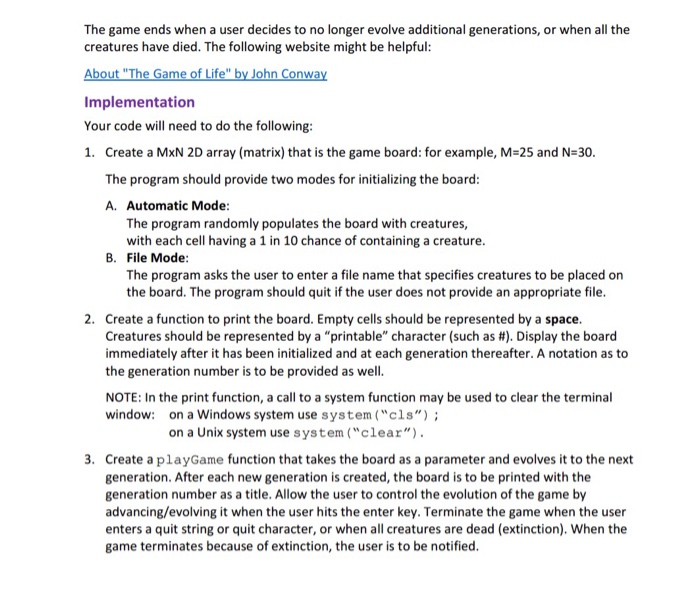
The game ends when a user decides to no longer evolve additional generations, or when all the creatures have died. The following website might be helpful hn Conw Implementation Your code will need to do the following 1. Create a MxN 2D array (matrix) that is the game board: for example, M 25 and N-30 The program should provide two modes for initializing the board A. Automatic Mode The program randomly populates the board with creatures, with each cell having a 1 in 10 chance of containing a creature B. File Mode The program asks the user to enter a file name that specifies creatures to be placed on the board. The program should quit if the user does not provide an appropriate file 2. Create a function to print the board. Empty cells should be represented by a space Creatures should be represented by a “printable” character (such as #). Display the board immediately after it has been initialized and at each generation thereafter. A notation as to the generation number is to be provided as well NOTE: In the print function, a call to a system function may be used to clear the terminal window: on a Windows system use system(“cls”) on a Unix system use system (“clear”) . Create a playGame function that takes the board as a parameter and evolves it to the next generation. After each new generation is created, the board is to be printed with the generation number as a title. Allow the user to control the evolution of the game by advancing/evolving it when the user hits the enter key. Terminate the game when the user enters a quit string or quit character, or when all creatures are dead (extinction). When the game terminates because of extinction, the user is to be notified
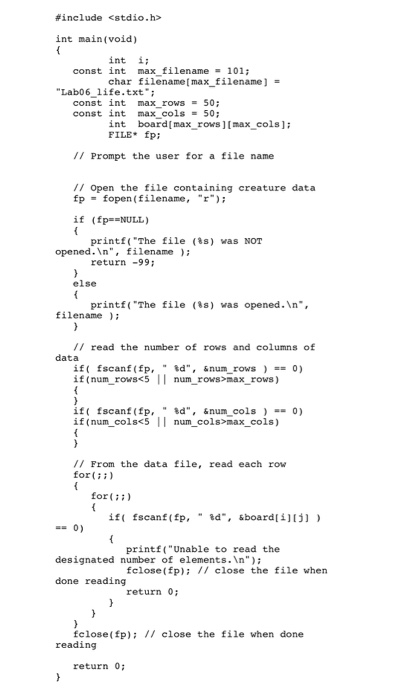
#include int main(void) int ii const int max filename 101; char filename[max filename)- “Lab06 1ife.txt ; const int max rows50; const int max cols 50 int board[ max rows ] [max cols] FILE fpi /I Prompt the user for a file name // Open the file containing creature data fp-fopen (filename, “r if (fpc=NULL ) printf(“The return -99; file (%s) NOT was opened.n”, filename else printf (“The file (%s) opened.n”, was filename // read the number of rows and columns of data if( fscanf ( fp, ” td”, &nun rows ) if (num rowmax rows) 0) if( fscanf ( fp, ” %d”, &num cols ) .. 0) if (num colsmax_cols) // From the data file, read each row for) for:) if( fscanf(fp, ” %d”, &board[1][j] ) 0) printf(“Unable to read the fclose (fp)i II close the file when return 0; designated number of elements.In”)i done reading fclose(fp): reading close the file when done return 0;
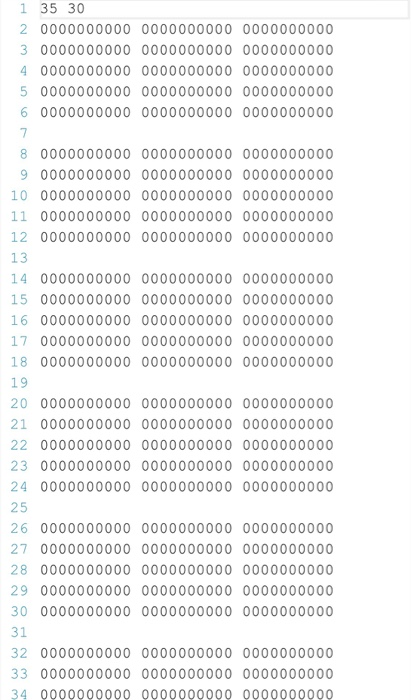
1 35 30 2 0000000000 0000000000 0000000000 3 0000000000 0000000000 0000000000 4 0000000000 0000000000 0000000000 5 0000000000 0000000000 0000000000 6 0000000000 0000000000 0000000000 8 0000000000 0000000000 0000000000 9 0000000000 0000000000 0000000000 10 0000000000 0000000000 0000000000 11 0000000000 0000000000 0000000000 12 0000000000 0000000000 0000000000 13 14 0000000000 0000000000 0000000000 15 0000000000 0000000000 0000000000 16 0000000000 0000000000 0000000000 17 0000000000 0000000000 0000000000 18 0000000000 0000000000 0000000000 19 20 0000000000 0000000000 0000000000 21 0000000000 0000000000 0000000000 22 0000000000 0000000000 0000000000 23 0000000000 0000000000 0000000000 24 0000000000 0000000000 0000000000 25 26 0000000000 0000000000 0000000000 27 0000000000 0000000000 0000000000 28 0000000000 0000000000 0000000000 29 0000000000 0000000000 0000000000 30 0000000000 0000000000 0000000000 31 32 0000000000 0000000000 0000000000 33 0000000000 0000000000 0000000000 34 0000000000 0000000000 0000000000
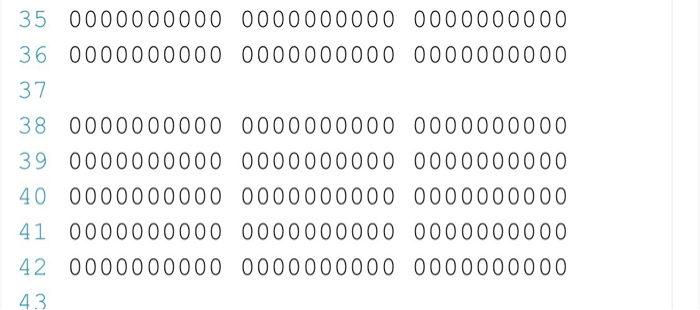
35 0000000000 0000000000 0000000000 36 00000000000000000000 0000000000 37 38 0000000000 0000000000 0000000000 39 0000000000 0000000000 0000000000 40 0000000000 0000000000 0000000000 41 0000000000 0000000000 0000000000 42 0000000000 0000000000 0000000000 4.3
Expert Answer
Answer to Today, you are going to create your own universe! You will control life and death! Actually, you are going to implement … . . .
OR
