
[Solved]4 Learned Floating Point Instructions Registers Convert Vector Vector Multiplication Code Q37139124

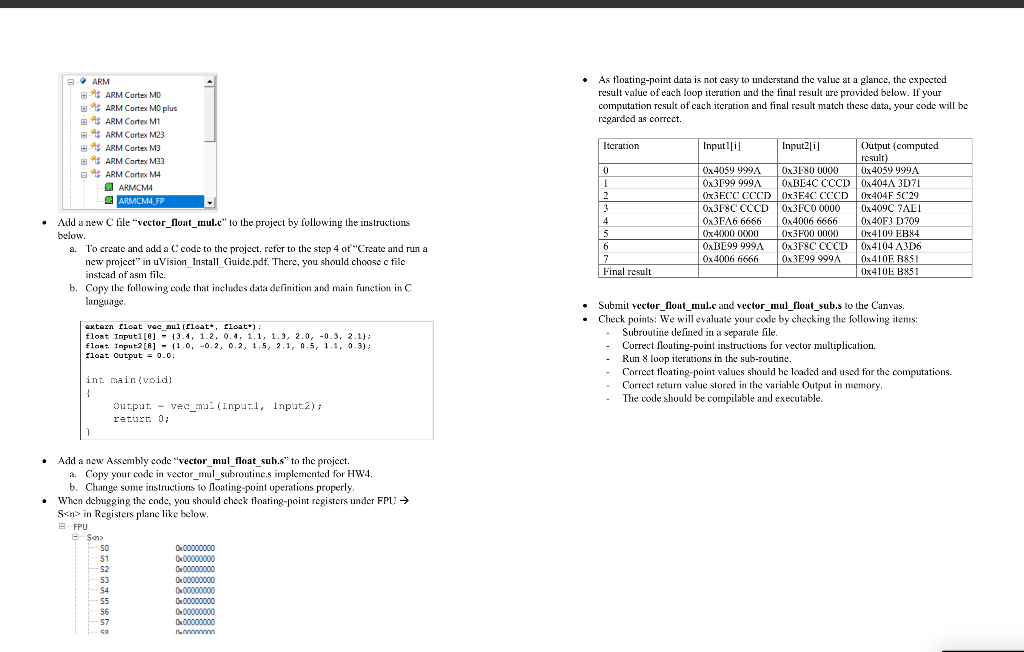
4. Now that you learned floating-point instructions and registers, convert your Vector-Vector Multiplication code implemented for HW4 to use floating-point data. Use the following C code for main function. Reuse your vector_mul subroutine.s file implemented for HW4 and replace instructions with floating-point operations properly. The input data should be changed like in the following C code. Cortex-M3 does not support floating point unit (FPU). Thus, we will use CorTex-M4 for this homework. Create a new project just like you created the other projects, except for the target core which should be ARMCM4_FP like below image (Choose ARM Cortex M4-ARMCM4 FP in step 2 of”Create and run a new project” in uVision_Install _Guide.pdf). The other steps are the same; you should use the same startup file that we used for the past projects. l .As tloating-point data is not casy to understand the valuc at a glance, the expocted ARM result value of each loop iterution and the final result ure provided below. If your computation result of each iteration and final result match these data, your code will be rcgarded as corrcct. ARM Cortex M10 ARM Cortex MO plus ARM Cortex M1 ARM Cortex M23 母齐ょARM Cortex M3 ARM Cortex M33 ARM Cortex M4 Itcration Inputl[i] Inputzlil Output (computed rcsult 0x4059 999AOx3FS0 0000 0x4059 999A Ox3F99 999A OxBD4C CCCD 0x404A 3DT x3ECC CCCD Ox3EAC CCCD x404F 5C29 Ox3F8C CCCD Ox3FCO 0000 x409C 7AL 0x3FA6 6666 0x4006 66660x40F3 D709 0x4000 0000 OxBE99 999A 0x3F8C CCCD0x4104 A3D6 0x4006 6666 0x3E99 999A0x410E B&S ARMCM4 ARMCM4 FP .Add a new C file “vector flo.” to the prvject by following the instructions x3F00) 0x4109 EB4 below To create and add a C code to the project, reter to the step 4 of”Create and run a new project in uVision Install CGuide.pdf. There, you should choosc c filc instcad ofasm file. a. Final result Ox410E B851 b. Copy te folowing code that ncludes data definition and main function in C anguage . Submit vector loat mul.c and vector mul float sub.s to the Canvas – Check points: We wl evaluate your code by checking the follwng items: – Subroute defined in a separale file – Correct foating-puint instructions for vector multiplication. – Run 8 loop iterations in the sub-routine – Correct floating-point values should be loaded and used for the computations. float Input1[8] – (3.4, 1.2. О.4. 1.1, 1.3, 2.0, -0.3, 2.1); float Input2[8]-10, -0.2, 0,2,1,5, 2,1, 0.5, 1.1, 0.3) loat utput- 0.0 Correct retur value stored in the variable Output in memory – The code should be cotpila ble adexecutable retur 0 Add a new Asscmbly code “vector mul float suh.sto the projcct. a. Copy your code in vector mul_subroutine.s implemented for HW4 b. Change some istucts to oang-point operations properly when debugging the cnde, you should chock floating-point registers under FPU → Snn Registers plane like below . E FPU 50 S1 S2 53 S4. S6 S7 Show transcribed image text 4. Now that you learned floating-point instructions and registers, convert your Vector-Vector Multiplication code implemented for HW4 to use floating-point data. Use the following C code for main function. Reuse your vector_mul subroutine.s file implemented for HW4 and replace instructions with floating-point operations properly. The input data should be changed like in the following C code. Cortex-M3 does not support floating point unit (FPU). Thus, we will use CorTex-M4 for this homework. Create a new project just like you created the other projects, except for the target core which should be ARMCM4_FP like below image (Choose ARM Cortex M4-ARMCM4 FP in step 2 of”Create and run a new project” in uVision_Install _Guide.pdf). The other steps are the same; you should use the same startup file that we used for the past projects.
l .As tloating-point data is not casy to understand the valuc at a glance, the expocted ARM result value of each loop iterution and the final result ure provided below. If your computation result of each iteration and final result match these data, your code will be rcgarded as corrcct. ARM Cortex M10 ARM Cortex MO plus ARM Cortex M1 ARM Cortex M23 母齐ょARM Cortex M3 ARM Cortex M33 ARM Cortex M4 Itcration Inputl[i] Inputzlil Output (computed rcsult 0x4059 999AOx3FS0 0000 0x4059 999A Ox3F99 999A OxBD4C CCCD 0x404A 3DT x3ECC CCCD Ox3EAC CCCD x404F 5C29 Ox3F8C CCCD Ox3FCO 0000 x409C 7AL 0x3FA6 6666 0x4006 66660x40F3 D709 0x4000 0000 OxBE99 999A 0x3F8C CCCD0x4104 A3D6 0x4006 6666 0x3E99 999A0x410E B&S ARMCM4 ARMCM4 FP .Add a new C file “vector flo.” to the prvject by following the instructions x3F00) 0x4109 EB4 below To create and add a C code to the project, reter to the step 4 of”Create and run a new project in uVision Install CGuide.pdf. There, you should choosc c filc instcad ofasm file. a. Final result Ox410E B851 b. Copy te folowing code that ncludes data definition and main function in C anguage . Submit vector loat mul.c and vector mul float sub.s to the Canvas – Check points: We wl evaluate your code by checking the follwng items: – Subroute defined in a separale file – Correct foating-puint instructions for vector multiplication. – Run 8 loop iterations in the sub-routine – Correct floating-point values should be loaded and used for the computations. float Input1[8] – (3.4, 1.2. О.4. 1.1, 1.3, 2.0, -0.3, 2.1); float Input2[8]-10, -0.2, 0,2,1,5, 2,1, 0.5, 1.1, 0.3) loat utput- 0.0 Correct retur value stored in the variable Output in memory – The code should be cotpila ble adexecutable retur 0 Add a new Asscmbly code “vector mul float suh.sto the projcct. a. Copy your code in vector mul_subroutine.s implemented for HW4 b. Change some istucts to oang-point operations properly when debugging the cnde, you should chock floating-point registers under FPU → Snn Registers plane like below . E FPU 50 S1 S2 53 S4. S6 S7
Expert Answer
Answer to 4. Now that you learned floating-point instructions and registers, convert your Vector-Vector Multiplication code implem… . . .
OR
