
[solved]-Vb Windows Forms App Netframework Summary Assignment Create Program Generate 21 Random Num Q39091722
VB Windows Forms APP (.NetFramework)
Summary: In this assignment you create aprogram to generate 21 random numbers, display them in a List Box,find Minimum, Maximum, Total and Average and display them in Labelcontrols.
Input data:
- Random numbers will be generated
Instructions:
- Create a new project and name it asyourlastname-firstname-Assignment5. Save thisproject in VB folder you created earlier.
- Change form’s title to: Your full name –Assignment 5 – Random Numbers.
- Form contains nine Labels, one List Box, and threeButton controls.
- Use List Box to display random number (make sure List Box istall enough to display all numbers), labels to identify RandomNumbers, Maximum, Minimum, Total and Average. And display thecorresponding data for Maximum, Minimum, Total and Average. Seebelow Form Layout with Controls for more details.Note: When naming controls, make sure you followcontrols’ naming convention we have learned in this class.
-
How to generate random numbers in VB?
First declare a “random object”
Dim objRandObject As NewRandom ‘ Need tocreate a “random object” first
To create a random number within range of 0-99, write:
intRandNum = objRandObject.Next(100)
Declare an array of uppersubscript of 20.
Fill the array with random numbers. Do not sort the array.
- How to find maximum, minimum total and average? SeeArrays slides.
– Input variables: None
– Computational variables:
- You need to create a Random Object first: objRandObjectAs New Random
- intNumbers(20)
- intRandNum
- intCount
– Output variables:
- intMax
- intMin
- intTotal
- intAverage
- Items to note:
- Variables names must follow the conventions and rules explainedearlier and must have proper data type for the values that will bestored in them.
- Appearance of the form is very important; Make sure that yourdesign is clean; Spelling is important.
- Fill And Computer button, generates 21 randomnumbers, displays them in the List Box, finds Maximum, Minimum,Total and Average and displays them.
- Clear button, clears List Box and four Labelcontrols on the right side. Before generating random numbers, clearthe List Box of any possible previous data.
- Exit button, closes the Form.
- You will write the code for the three buttons.
- Avoid double-clicking on List Box and Label Controls to createunnecessary code. If you do, please delete them.
- Run the program, click Fill And Computerbutton to display 21 random numbers in List Box, Maximum, Minimum,Total and Average of these numbers. See example for the completeprogram below.
- To save the project, from File, select Save All.
- Continue with SaveAll after making changes.
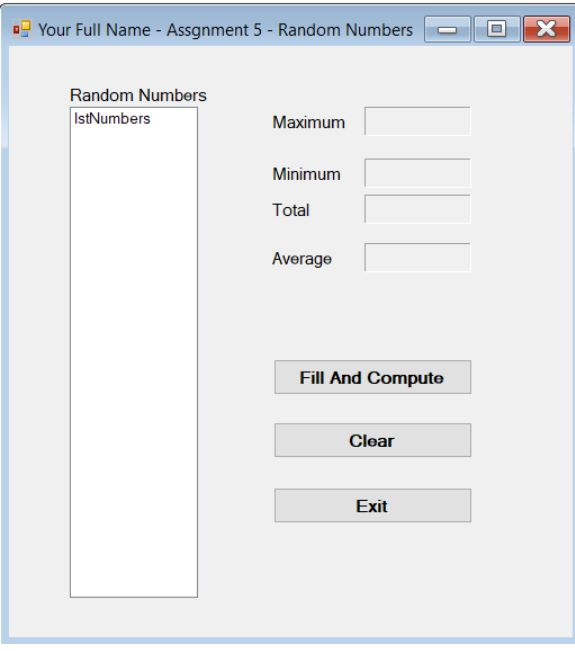
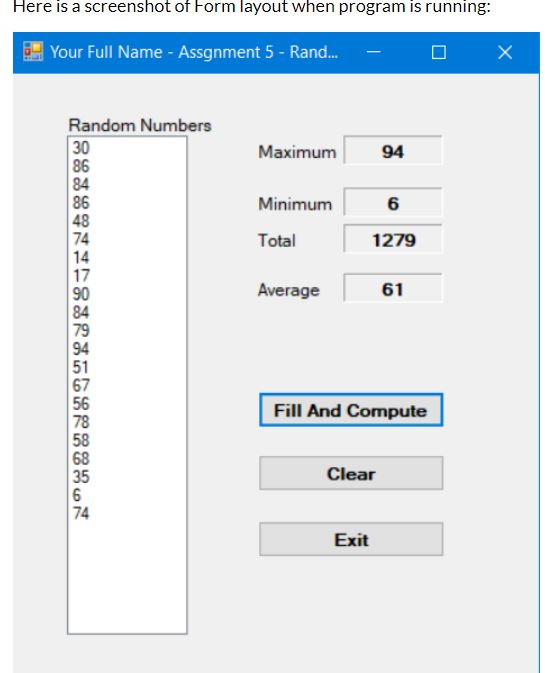
X Your Full Name-Assgnment 5 – Random Numbers Random Numbers IstNumbers Maximum Minimum Total Average Fill And Compute Clear Exit Here is a screenshot of Form layout when program is running: Your Full Name – Assgnment 5- Rand… X Random Numbers 30 86 84 86 48 74 14 17 90 84 79 94 51 67 56 78 58 68 35 Maximum 94 Minimum 6 Total 1279 Average 61 Fill And Compute Clear 74 Exit co Show transcribed image text X Your Full Name-Assgnment 5 – Random Numbers Random Numbers IstNumbers Maximum Minimum Total Average Fill And Compute Clear Exit
Here is a screenshot of Form layout when program is running: Your Full Name – Assgnment 5- Rand… X Random Numbers 30 86 84 86 48 74 14 17 90 84 79 94 51 67 56 78 58 68 35 Maximum 94 Minimum 6 Total 1279 Average 61 Fill And Compute Clear 74 Exit co
Expert Answer
Answer to VB Windows Forms APP (.NetFramework) Summary: In this assignment you create a program to generate 21 random numbers, dis… . . .
OR
