
[Solved]-Use Rand Srand Come C Libraries Different Libraries Different Implementations Need Sequenc Q37206878
CLanguage Programming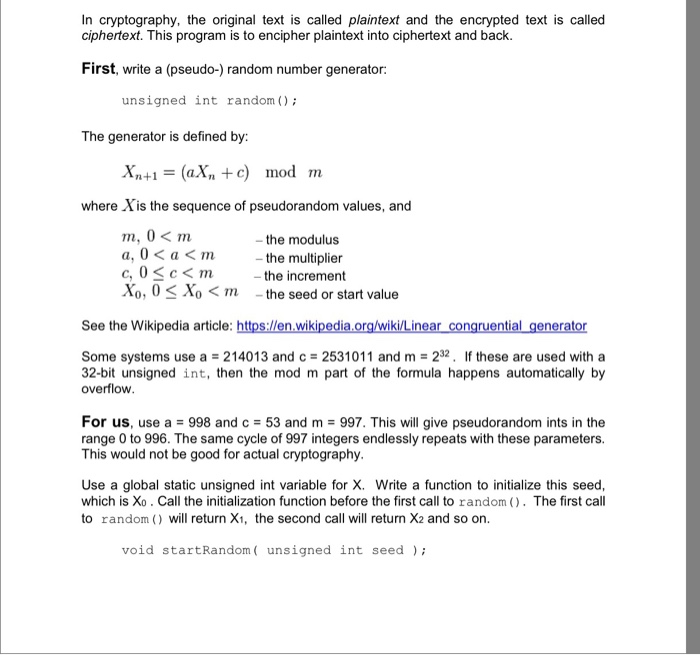
 We were unable to transcribe this imageWhy not just use the rand and srand that come with the C libraries? Because different libraries have different implementations of these and we need the same sequence of random numbers on both the sender side and the receiver side. Next, write the enciphering program. The program is called from the command line C:SomeDirectory> cipher 3415 plaintext.txt ciphertext.txt The program initializes the random number generator using the key 3415 and then opens the file plaintext.txt for BINARY reading. You need to open it for binary so that the program works with all kinds of files, ordinary text, Word files, image files, and so on. Open ciphertext.txt for binary writing. Then the program reads the input file byte-by-byte and writes the output file byte-by-byte Use fgetc for reading the input. For each byte of the input file: Read input byte B Generate the next random number R B BXOR R mod 256 Write B to the output file o o o o Input bytes are read into an int, but the high-order three bytes are zero. Compute the XOR with the full int that your random returns. It does not matter that this int has some bits set above the low order byte. To decipher a file, use the same program with the same key C:SomeDirectory> cipher 3415 ciphertext.txt decipher.txt You should get exactly the same bytes as in the original file. Test this with some image files and some executable files Notes: You will need to use command line parameters for this and to use standard CO functions. See the textbook for both of these, or look at 14 mmi for command line parameters. Use atoi command line into an int. to convert the string of digits from the As an intermediate step in creating and debugging your program use rand and srand) from the C library. But the final version should use the random functions described above. Document your code nicely, use sensible layout and indenting, use sensible variable names, and test thoroughly. Turn in a source file using the Blackboard assignments tool. It will probably be useful for testing to create a directory where you can place the executable along with some test files. Show transcribed image text
Why not just use the rand and srand that come with the C libraries? Because different libraries have different implementations of these and we need the same sequence of random numbers on both the sender side and the receiver side. Next, write the enciphering program. The program is called from the command line C:SomeDirectory> cipher 3415 plaintext.txt ciphertext.txt The program initializes the random number generator using the key 3415 and then opens the file plaintext.txt for BINARY reading. You need to open it for binary so that the program works with all kinds of files, ordinary text, Word files, image files, and so on. Open ciphertext.txt for binary writing. Then the program reads the input file byte-by-byte and writes the output file byte-by-byte Use fgetc for reading the input. For each byte of the input file: Read input byte B Generate the next random number R B BXOR R mod 256 Write B to the output file o o o o Input bytes are read into an int, but the high-order three bytes are zero. Compute the XOR with the full int that your random returns. It does not matter that this int has some bits set above the low order byte. To decipher a file, use the same program with the same key C:SomeDirectory> cipher 3415 ciphertext.txt decipher.txt You should get exactly the same bytes as in the original file. Test this with some image files and some executable files Notes: You will need to use command line parameters for this and to use standard CO functions. See the textbook for both of these, or look at 14 mmi for command line parameters. Use atoi command line into an int. to convert the string of digits from the As an intermediate step in creating and debugging your program use rand and srand) from the C library. But the final version should use the random functions described above. Document your code nicely, use sensible layout and indenting, use sensible variable names, and test thoroughly. Turn in a source file using the Blackboard assignments tool. It will probably be useful for testing to create a directory where you can place the executable along with some test files.
Expert Answer
Answer to Why not just use the rand and srand that come with the C libraries? Because different libraries have different implement… . . .
OR
