
[solved]-Hello Inteoduction Java Class Write Code Little Worried Incorrect Please Solve Compare Cod Q39051546
hello, i am in a inteoduction to java class. i am to write code butI am a little worried that what i have is incorrect. Please solveso i can compare it to my code that i came up with. like i said, weare using java. plase use proper coding style, as the professorgets upset if we dont. plus it makes it easier to compare to mysolution. The twxt is introductioj to programmmjnf by john dean.Thanks! below is the directions / sample session.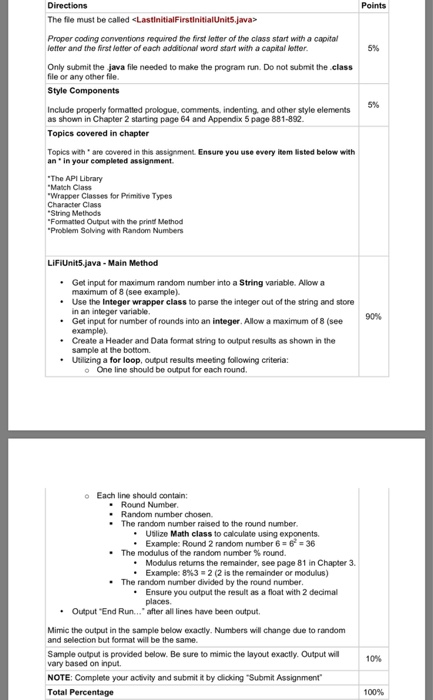
 Directions The file must be called <LastinitialFirsinitialUnits.java> Points Proper coding conventions required the first letter of the class start with a capital letter and the first letter of each additional word start with a capital letter. 5% Only submit the java file needed to make the program run. Do not submit the class file or any other file. Style Components Include property formatted prologue, comments, indenting, and other style elements as shown in Chapter 2 starting page 64 and Appendix 5 page 881-892. Topics covered in chapter Topics with are covered in this assignment. Ensure you use every item listed below with an in your completed assignment “The API Library “Match Class “Wrapper Classes for Primitive Types Character Class String Methods “Formatted Output with the print Method “Problem Solving with Random Numbers LiFiUnit5.java – Main Method 90% • Get input for maximum random number into a string variable. Allow a maximum of 8 (see example) • Use the Integer wrapper class to parse the integer out of the string and store in an integer variable. • Get input for number of rounds into an integer. Allow a maximum of 8 (see example) • Create a Header and Data format string to output results as shown in the sample at the bottom • Utilizing a for loop, output results meeting following criteria: One line should be output for each round Each line should contain: . Round Number • Random number chosen • The random number raised to the round number. • Utilize Math class to calculate using exponents. • Example: Round 2 random number 6 = 6 = 36 • The modulus of the random number % round. . Modulus returns the remainder, see page 81 in Chapter 3 . Example: 8%32 (2 is the remainder or modulus) • The random number divided by the round number. • Ensure you output the result as a float with 2 decimal places • Output “End Run… after all lines have been output Mimic the output in the sample below exactly. Numbers will change due to random and selection but format will be the same. Sample output is provided below. Be sure to mimic the layout exactly. Output will vary based on input. NOTE: Complete your activity and submit it by clicking “Submit Assignment Total Percentage 10% 100% Sample Max Random Number and Number of Rounds will vary based on input: Below are 3 different random examples based on the input given. Your output will vary but the format will be the same. Sample when 8 and 8 are entered. Please enter the maximum random number to be used (2-8): 8 Please enter the number of rounds (1-8): 8 Round Rand # Rand Round Modulus Rand/Round 7.00 2.00 0.33 1.75 0.20 2,401 64 0.33 78,125 0.71 65,536 0.50 End Run… Max random and number of rounds both entered with values above Please enter the maximum random number to be used (2-8): 12 Random larger than 8 entered, using max number of 8. Please enter the number of rounds (1-8): 9 Rounds larger than 8 entered, lusing max number of 8. Round Rand # Rand Round 512 COWN Modulus Rand/Round 5.00 1.00 2.67 0.25 0.60 1.17 1.00 0.25 243 117,649 823,543 256 End Run… Show transcribed image text Directions The file must be called Points Proper coding conventions required the first letter of the class start with a capital letter and the first letter of each additional word start with a capital letter. 5% Only submit the java file needed to make the program run. Do not submit the class file or any other file. Style Components Include property formatted prologue, comments, indenting, and other style elements as shown in Chapter 2 starting page 64 and Appendix 5 page 881-892. Topics covered in chapter Topics with are covered in this assignment. Ensure you use every item listed below with an in your completed assignment “The API Library “Match Class “Wrapper Classes for Primitive Types Character Class String Methods “Formatted Output with the print Method “Problem Solving with Random Numbers LiFiUnit5.java – Main Method 90% • Get input for maximum random number into a string variable. Allow a maximum of 8 (see example) • Use the Integer wrapper class to parse the integer out of the string and store in an integer variable. • Get input for number of rounds into an integer. Allow a maximum of 8 (see example) • Create a Header and Data format string to output results as shown in the sample at the bottom • Utilizing a for loop, output results meeting following criteria: One line should be output for each round Each line should contain: . Round Number • Random number chosen • The random number raised to the round number. • Utilize Math class to calculate using exponents. • Example: Round 2 random number 6 = 6 = 36 • The modulus of the random number % round. . Modulus returns the remainder, see page 81 in Chapter 3 . Example: 8%32 (2 is the remainder or modulus) • The random number divided by the round number. • Ensure you output the result as a float with 2 decimal places • Output “End Run… after all lines have been output Mimic the output in the sample below exactly. Numbers will change due to random and selection but format will be the same. Sample output is provided below. Be sure to mimic the layout exactly. Output will vary based on input. NOTE: Complete your activity and submit it by clicking “Submit Assignment Total Percentage 10% 100%
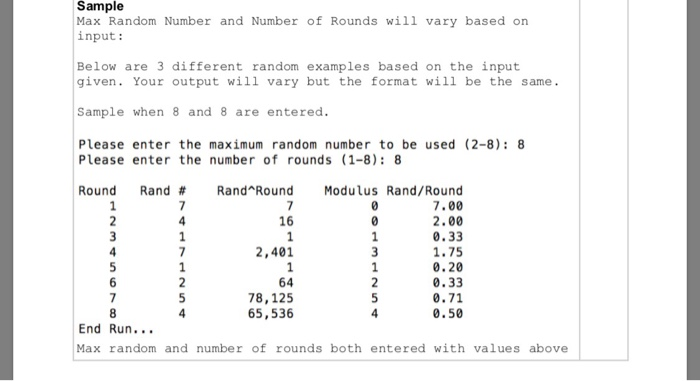
Sample Max Random Number and Number of Rounds will vary based on input: Below are 3 different random examples based on the input given. Your output will vary but the format will be the same. Sample when 8 and 8 are entered. Please enter the maximum random number to be used (2-8): 8 Please enter the number of rounds (1-8): 8 Round Rand # Rand Round Modulus Rand/Round 7.00 2.00 0.33 1.75 0.20 2,401 64 0.33 78,125 0.71 65,536 0.50 End Run… Max random and number of rounds both entered with values above
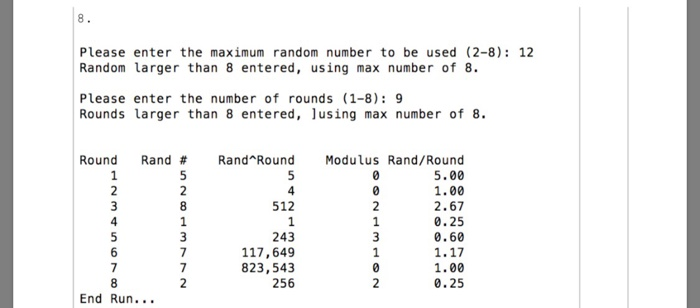
Please enter the maximum random number to be used (2-8): 12 Random larger than 8 entered, using max number of 8. Please enter the number of rounds (1-8): 9 Rounds larger than 8 entered, lusing max number of 8. Round Rand # Rand Round 512 COWN Modulus Rand/Round 5.00 1.00 2.67 0.25 0.60 1.17 1.00 0.25 243 117,649 823,543 256 End Run…
Expert Answer
Answer to hello, i am in a inteoduction to java class. i am to write code but I am a little worried that what i have is incorrect…. . . .
OR
