
[Solved] C Update Total Credit Hours Textbox Registration Confirmed Selected Course Using Systemwin Q37192016
C#
update the total credit hours textbox if registration isconfirmed for a selected course.
using System.Windows;
using System.Windows.Controls;
using System.Windows.Data;
using System.Windows.Documents;
using System.Windows.Input;
using System.Windows.Media;
using System.Windows.Media.Imaging;
using System.Windows.Navigation;
using System.Windows.Shapes;
namespace WPFRegisterStudent
{
/// <summary>
/// Interaction logic for MainWindow.xaml
/// </summary>
public partial class MainWindow : Window
{
Course choice;
private int totalCredits;//added this for the credits
public MainWindow()
{
InitializeComponent();
}
private void Window_Loaded(object sender, RoutedEventArgse)
{
Course course1 = new Course(“IT 145”);
Course course2 = new Course(“IT 200”);
Course course3 = new Course(“IT 201”);
Course course4 = new Course(“IT 270”);
Course course5 = new Course(“IT 315”);
Course course6 = new Course(“IT 328”);
Course course7 = new Course(“IT 330”);
this.comboBox.Items.Add(course1);
this.comboBox.Items.Add(course2);
this.comboBox.Items.Add(course3);
this.comboBox.Items.Add(course4);
this.comboBox.Items.Add(course5);
this.comboBox.Items.Add(course6);
this.comboBox.Items.Add(course7);
ItemCollection courses = this.comboBox.Items;//set credits forcourse
foreach (Course course in courses)
{
course.SetCredits(3);
}
this.textBox.Text = “”;
}
private void button_Click(object sender, RoutedEventArgse)
{
choice = (Course)(this.comboBox.SelectedItem);
// update the total credit hours textbox if registration isconfirmed for a selected course
if (choice != null)
{
if (totalCredits == 9) // check whether it is completed the 9credit hours of the registered courses.
{
MessageBox.Show(“You can not register for more than 9 credithours.”, “Message”, MessageBoxButton.OK,MessageBoxImage.Warning);
}
else if (IsAlreadyRegisteredCourse(choice)) // check whether theselected course is already registered.
{
MessageBox.Show(“Already registerd. Please registered for anothercourse.”, “Message”, MessageBoxButton.OK,MessageBoxImage.Warning);
}
else
{
// add the registered course name to the listbox
this.listBox.Items.Add(choice.ToString());
// increase the total credits
totalCredits += choice.GetCredits();
}
}
else
{
MessageBox.Show(“Please choose a course to register.”, “Message”,MessageBoxButton.OK, MessageBoxImage.Warning);
}
}
private bool IsAlreadyRegisteredCourse(Course choice) // checkwhether the choose course is already registered.
{
bool registered = false;
ItemCollection registeredCourses = this.listBox.Items;
foreach (string course in registeredCourses)
{
if (course.Equals(choice.getName()))
{
registered = true;
break;
}
else
{
MessageBox.Show(“Please choose a course to register.”, “Message”,MessageBoxButton.OK, MessageBoxImage.Warning);
}
}
return registered;
}
}
}
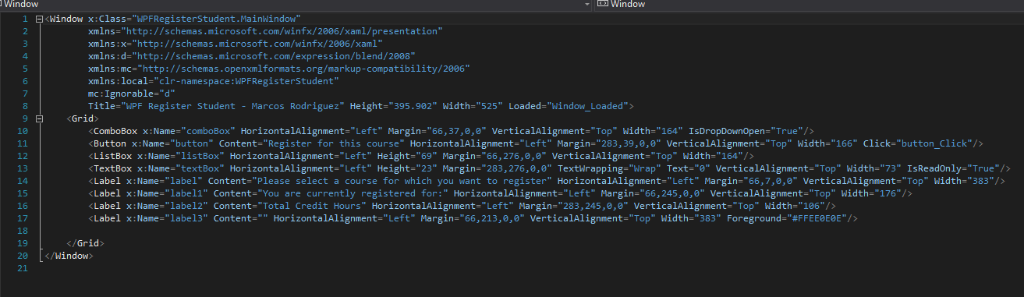
heres the code for the window for reference
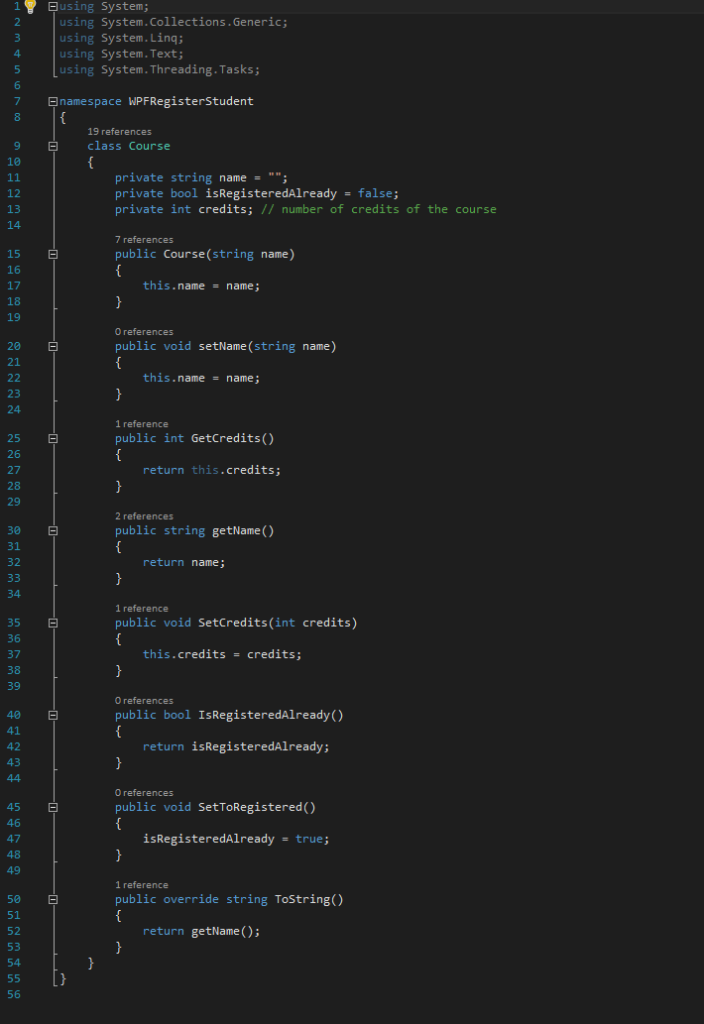
heres the code found in the course.cs for reference
Window LE3WindoW 1 E<Window x:Class- “PFRegisterStudent.Mainwindow xmlns-“http://schemas.microsoft.com/winfx/2006/xaml/presentation” xmlns:x-“http://schemas.microsoft.com/winfx/2006/xaml xmlns:d-“http://schemas.microsoft.com/expression/blend/2008 xmins:mc-“http://schemas openxmlformats.org/markup-compatibility/2886 xmins:local-“clr-namespace:WPFRegisterstudent” mc: Ignorable-“d” Title-“MPF Register Student -Marcos Rodríguez” Height-“395.982″ ผǐdth=”525″ Loaded=”window-Loaded”> .comboBox x_Name=”conboBox HorizontalAlignment,’Left Margin-66,37,0,0″ VerticalAlignment-“Top” ผǐdth- 164″ 1sDropDownOpen-True /> Button x:Name-“button” Content-“Register for this course” HorizontalAlignment-“Left” Margin-“283,39,,0” VerticalAlignment-“Top” Width-“166 Click-“button_Click”> LİstBox x : Name-“listBox” HorizontalAlignment–Left’, Heighte”69″ Margin-“66, 276,0,0. VerticalAlignment.”Top” Ilidth-“164″/> TextBox x Na e-textBox” HorizontalAlignment–Left Height- 23 Margin-783, 276 0,0 Textirapping-Wrap” Text-0 VerticalAlignment.”Top” ผǐdth-’73” 1sReadOnly-“True”/> Label x:Nane-label-Content-Please select a course for which you want to register” HorizontalAlignment-“Left” Margin-“66, 7, e,e” verticalAlignent-“Top” ผǐdth””383″/> aeobe Label x:Name-“label1” Content-“You are currently registered for:” HorizontalAlignment-“Left” Margin-“66,245,0,” VerticalAlignment-“Top” Width-“176″7> Label x:Name-“labe12″ Content-Total Credit Hours” HorizontalAlignment- “Left” Margin- “283,245,8,e VerticalAlignment-Top Width-“186”> Label x:Nane-“label3″ Content,'” HorizontalAlignment,’Left-Margin-V6, 213,0,0″ verticalAlignment-“Top-width-783” Foreground-“#FFEEeeaE”/> 15 17 /Grid 29 しく/window using 1 System; using System.Collections.Generic; 3 using System.Ling 4 using System.Text; s Lusing System.Threading.Tasks namespace WPFRegisterStudent 8 19 references class Course 10 private string name private bool İsRegisteredAlready = false; private int credits; // number of credits of the course 12 13 15 16 17 18 19 public Course(string name) this.name name 0 references public void setName (string name) 20 E 21 this.name name; 23 24 1 reference public int GetCredits) 25 E 26 27 28 29 return this.credits; 2 references public string getName() 30 E 31 32 return name; 1 reference public void SetCredits(int credits) 35 E 36 37 38 39 this.credits – credits; O references public bool IsRegisteredAlready) 40 41 42 43 return İsRegisteredAlready; 0 references public void SetToRegistered() 45 E 46 47 48 49 isRegisteredAlready -true 1 reference public override string ToString) 50 51 52 53 54 return getName) 56 Show transcribed image text Window LE3WindoW 1 E .comboBox x_Name=”conboBox HorizontalAlignment,’Left Margin-66,37,0,0” VerticalAlignment-“Top” ผǐdth- 164″ 1sDropDownOpen-True /> Button x:Name-“button” Content-“Register for this course” HorizontalAlignment-“Left” Margin-“283,39,,0” VerticalAlignment-“Top” Width-“166 Click-“button_Click”> LİstBox x : Name-“listBox” HorizontalAlignment–Left’, Heighte”69″ Margin-“66, 276,0,0. VerticalAlignment.”Top” Ilidth-“164″/> TextBox x Na e-textBox” HorizontalAlignment–Left Height- 23 Margin-783, 276 0,0 Textirapping-Wrap” Text-0 VerticalAlignment.”Top” ผǐdth-’73” 1sReadOnly-“True”/> Label x:Nane-label-Content-Please select a course for which you want to register” HorizontalAlignment-“Left” Margin-“66, 7, e,e” verticalAlignent-“Top” ผǐdth””383″/> aeobe Label x:Name-“label1” Content-“You are currently registered for:” HorizontalAlignment-“Left” Margin-“66,245,0,” VerticalAlignment-“Top” Width-“176″7> Label x:Name-“labe12″ Content-Total Credit Hours” HorizontalAlignment- “Left” Margin- “283,245,8,e VerticalAlignment-Top Width-“186”> Label x:Nane-“label3″ Content,'” HorizontalAlignment,’Left-Margin-V6, 213,0,0″ verticalAlignment-“Top-width-783” Foreground-“#FFEEeeaE”/> 15 17 /Grid 29 しく/window
using 1 System; using System.Collections.Generic; 3 using System.Ling 4 using System.Text; s Lusing System.Threading.Tasks namespace WPFRegisterStudent 8 19 references class Course 10 private string name private bool İsRegisteredAlready = false; private int credits; // number of credits of the course 12 13 15 16 17 18 19 public Course(string name) this.name name 0 references public void setName (string name) 20 E 21 this.name name; 23 24 1 reference public int GetCredits) 25 E 26 27 28 29 return this.credits; 2 references public string getName() 30 E 31 32 return name; 1 reference public void SetCredits(int credits) 35 E 36 37 38 39 this.credits – credits; O references public bool IsRegisteredAlready) 40 41 42 43 return İsRegisteredAlready; 0 references public void SetToRegistered() 45 E 46 47 48 49 isRegisteredAlready -true 1 reference public override string ToString) 50 51 52 53 54 return getName) 56
Expert Answer
Answer to C# update the total credit hours textbox if registration is confirmed for a selected course. using System.Windows; using… . . .
OR
