
[Solved]-Question 3 Product Classpy Develop Class Called Product Initialized Using Following Values Q37178494
USE PYTHON: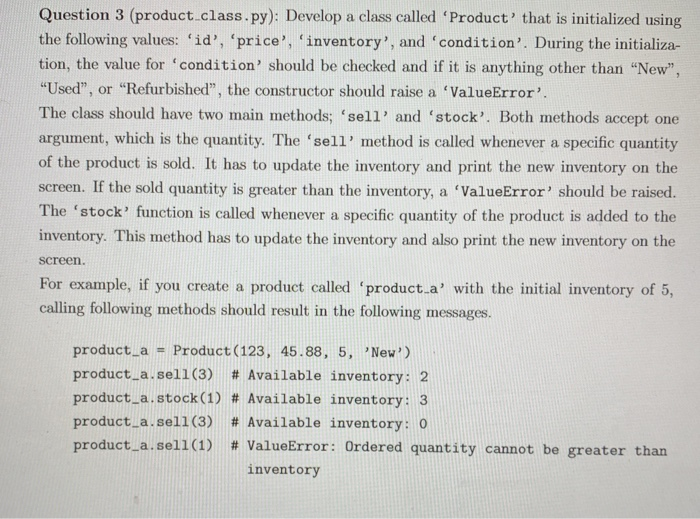
 Question 3 (product class.py): Develop a class called ‘Product’ that is initialized using the following values: ‘id’, ‘price’, ‘inventory’, and ‘condition’. During the initializa- tion, the value for ‘condition’ should be checked and if it is anything other than “New” “Used”, or “Refurbished”, the constructor should raise a ValueError’ The class should have two main miethods:”sell, and ‘stock’. Both methods accept one argument, which is the quantity. The ‘sell’ method is called whenever a specific quantity of the product is sold. It has to update the inventory and print the new inventory on the screen. If the sold quantity is greater than the inventory, a ‘ValueError’ should be raised. The ‘stock’ function is called whenever a specific quantity of the product is added to the inventory. This method has to update the inventory and also print the new inventory on the screen For example, if you create a product called ‘product-a, with the initial inventory of 5, calling following methods should result in the following messages. product-a = Product (123, 45.88, 5, ,New!) product-a.sell(3) # Available inventory: 2 product-a.stock (1) # Available inventory: 3 product-a.sell (3) # Available inventory: 0 product-a.se11(1) # ValueError: 0rdered quantity cannot be greater than inventory Next, develop two methods to start and end a sale on the product. The ‘start.sale’ l should accepts one argument, which is the percentage off the price. Then, it should update the price and print the new price. The ‘end.sale’ method should revert the price back to the original price and print the updated price. If ‘start.sale’ is called while a sale is already going on, it should print a message that a sale is already going on and ignore the price change. A sample scenario is included below. product-a.start-sale (0.5) product.a.end sale(O product-a” start-sale(0.25) product-a” start-sale(0.5) # Price changed to-) $22.94 # Price changed to-) $45.88 # Price changed to → $34.41 # A sale is already going on, change cannot the price # Price changed to product a.end sale) $45.88 Show transcribed image text Question 3 (product class.py): Develop a class called ‘Product’ that is initialized using the following values: ‘id’, ‘price’, ‘inventory’, and ‘condition’. During the initializa- tion, the value for ‘condition’ should be checked and if it is anything other than “New” “Used”, or “Refurbished”, the constructor should raise a ValueError’ The class should have two main miethods:”sell, and ‘stock’. Both methods accept one argument, which is the quantity. The ‘sell’ method is called whenever a specific quantity of the product is sold. It has to update the inventory and print the new inventory on the screen. If the sold quantity is greater than the inventory, a ‘ValueError’ should be raised. The ‘stock’ function is called whenever a specific quantity of the product is added to the inventory. This method has to update the inventory and also print the new inventory on the screen For example, if you create a product called ‘product-a, with the initial inventory of 5, calling following methods should result in the following messages. product-a = Product (123, 45.88, 5, ,New!) product-a.sell(3) # Available inventory: 2 product-a.stock (1) # Available inventory: 3 product-a.sell (3) # Available inventory: 0 product-a.se11(1) # ValueError: 0rdered quantity cannot be greater than inventory
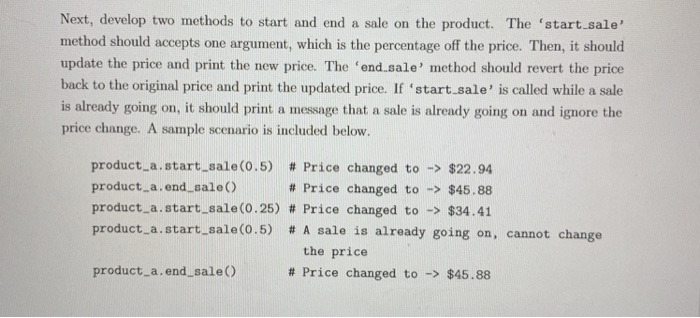
Next, develop two methods to start and end a sale on the product. The ‘start.sale’ l should accepts one argument, which is the percentage off the price. Then, it should update the price and print the new price. The ‘end.sale’ method should revert the price back to the original price and print the updated price. If ‘start.sale’ is called while a sale is already going on, it should print a message that a sale is already going on and ignore the price change. A sample scenario is included below. product-a.start-sale (0.5) product.a.end sale(O product-a” start-sale(0.25) product-a” start-sale(0.5) # Price changed to-) $22.94 # Price changed to-) $45.88 # Price changed to → $34.41 # A sale is already going on, change cannot the price # Price changed to product a.end sale) $45.88
Expert Answer
Answer to Question 3 (product class.py): Develop a class called ‘Product’ that is initialized using the following values: ‘id’, ‘p… . . .
OR
