[Solved]Menu 1 Display Seat Chart 2 Reserve Seat 3 Cancel Reservatiorn 4 Save Seat Chart File 5 St Q37149936
![]()
C++ we must use class and array 2dimensional
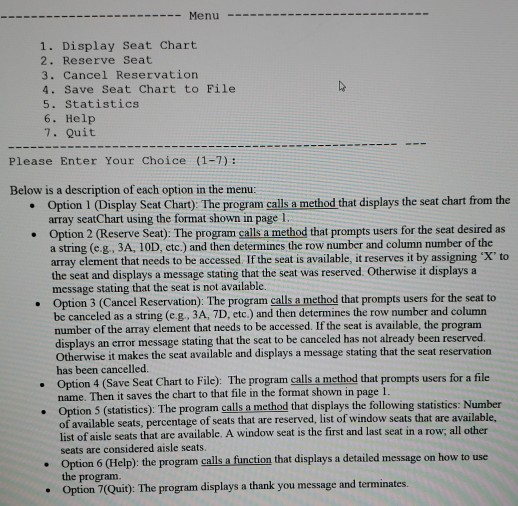
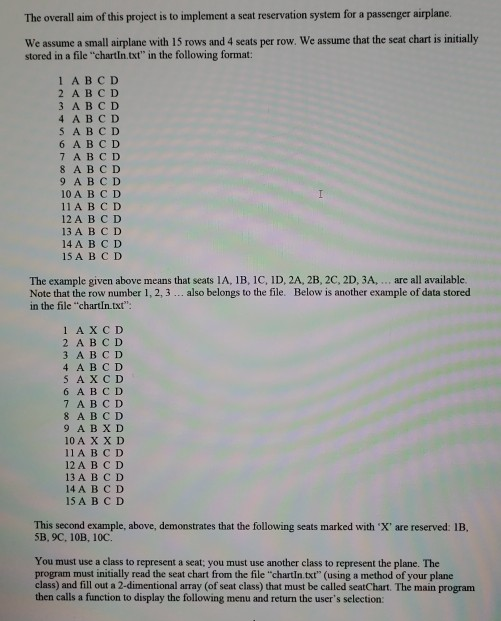
Menu- 1. Display Seat Chart 2. Reserve Seat 3. Cancel Reservatiorn 4. Save Seat Chart to File 5. Statistics 6. Help 7. Quit Please Enter Your Choice (1-7): Below is a description of each option in the menu: . Option 1 (Display Seat Chart): The program calls a method that displays the seat chart from the array seatChart using the format shown in page 1 Option 2 (Reserve Seat). The program calls a method that prompts users for the seat desired as a string (e g , 3A, 10D, etc.) and then determines the row number and column number of the array element that needs to be accessed. If the seat is available, it reserves it by assigning ‘X’ to · the seat and displays a message stating that the seat was reserved. Otherwise it displays a message stating that the seat is not available. Option 3 (Cancel Reservation): The program calls a method that prompts users for the seat to be canceled as a string (c g, 3A, 7D, etc.) and then determines the row number and column number of the array element that needs to be accessed. If the seat is available, the program displays an error message stating that the seat to be canceled has not already been reserved Otherwise it makes the seat available and displays a message stating that the seat reservation has been cancelled. Option 4 (Save Seat Chart to File): The program calls a method that prompts users for a file name. Then it saves the chart to that file in the format shown in page1 Option 5 (statistics): The program calls a method that displays the following statistics: Number of available seats, percentage of seats that are reserved, list list of aisle seats that are available. A window seat is the first and last seat in a row; all other of window seats that are available, seats are considered aisle seats Option 6 (Help): the program calls a function that displays a detailed message on how to use the program. Option 7(Quit): The program displays a thank you message and terminates. The overall aim of this project is to implement a seat reservation system for a passenger airplane We assume a small airplane with 15 rows and 4 seats per row. We assume that the seat chart is initially stored in a file “chartIn.txt” in the following format: 1ABCD 2 ABCD 3 ABCD 4 A B CD S A B CD 6 ABCD 7 ABC D 8 ABC D 9 A BCD 10 A BC D 11 A BC D 12A B C D 13 A B C D 14A B C D 15 A B C D The example given above means that seats l A, IB, l C, ID, 2A, 2B, 2C, 2D, 3A, . . . are all available. Note that the row number 1,2,3… also belongs to the file. Below is another example of data stored in the file “chartIn.txt” 1 AXCD 2 ABCD 3 A B C D 4 ABCD 6 A BCD 7 A BC D 8 A B C D 10 A X X D 11A BC D 12 A B C D 13 A BC D 14 A BCD 15ABCD This second example, above, demonstrates that the following seats marked with ‘X’ are reserved: IB, 5B, 9C, 10B, 10C. You must use a class to represent a seat: you must use another class to represent the plane. The program must initially read the seat chart from the file “chartIn.txt” (using a method of your plane class) and fill out a 2-dimentional array (of seat class) that must be called seatChart. The main program then calls a function to display the following menu and return the user’s selection: Show transcribed image text Menu- 1. Display Seat Chart 2. Reserve Seat 3. Cancel Reservatiorn 4. Save Seat Chart to File 5. Statistics 6. Help 7. Quit Please Enter Your Choice (1-7): Below is a description of each option in the menu: . Option 1 (Display Seat Chart): The program calls a method that displays the seat chart from the array seatChart using the format shown in page 1 Option 2 (Reserve Seat). The program calls a method that prompts users for the seat desired as a string (e g , 3A, 10D, etc.) and then determines the row number and column number of the array element that needs to be accessed. If the seat is available, it reserves it by assigning ‘X’ to · the seat and displays a message stating that the seat was reserved. Otherwise it displays a message stating that the seat is not available. Option 3 (Cancel Reservation): The program calls a method that prompts users for the seat to be canceled as a string (c g, 3A, 7D, etc.) and then determines the row number and column number of the array element that needs to be accessed. If the seat is available, the program displays an error message stating that the seat to be canceled has not already been reserved Otherwise it makes the seat available and displays a message stating that the seat reservation has been cancelled. Option 4 (Save Seat Chart to File): The program calls a method that prompts users for a file name. Then it saves the chart to that file in the format shown in page1 Option 5 (statistics): The program calls a method that displays the following statistics: Number of available seats, percentage of seats that are reserved, list list of aisle seats that are available. A window seat is the first and last seat in a row; all other of window seats that are available, seats are considered aisle seats Option 6 (Help): the program calls a function that displays a detailed message on how to use the program. Option 7(Quit): The program displays a thank you message and terminates.
The overall aim of this project is to implement a seat reservation system for a passenger airplane We assume a small airplane with 15 rows and 4 seats per row. We assume that the seat chart is initially stored in a file “chartIn.txt” in the following format: 1ABCD 2 ABCD 3 ABCD 4 A B CD S A B CD 6 ABCD 7 ABC D 8 ABC D 9 A BCD 10 A BC D 11 A BC D 12A B C D 13 A B C D 14A B C D 15 A B C D The example given above means that seats l A, IB, l C, ID, 2A, 2B, 2C, 2D, 3A, . . . are all available. Note that the row number 1,2,3… also belongs to the file. Below is another example of data stored in the file “chartIn.txt” 1 AXCD 2 ABCD 3 A B C D 4 ABCD 6 A BCD 7 A BC D 8 A B C D 10 A X X D 11A BC D 12 A B C D 13 A BC D 14 A BCD 15ABCD This second example, above, demonstrates that the following seats marked with ‘X’ are reserved: IB, 5B, 9C, 10B, 10C. You must use a class to represent a seat: you must use another class to represent the plane. The program must initially read the seat chart from the file “chartIn.txt” (using a method of your plane class) and fill out a 2-dimentional array (of seat class) that must be called seatChart. The main program then calls a function to display the following menu and return the user’s selection:
Expert Answer
Answer to Menu- 1. Display Seat Chart 2. Reserve Seat 3. Cancel Reservatiorn 4. Save Seat Chart to File 5. Statistics 6. Help 7. Q… . . .
Related

